WooCommerce deducts the stock. We calculate when and how much to reorder.
For WordPress stores running WooCommerce that buy from suppliers and hold their own stock. We read orders and stock for every product and variation through the REST API that WooCommerce already includes, install nothing in your WordPress, rebuild the stock history WooCommerce does not keep, and propose each week what to reorder.
Book a 30-minute demoHow it works
Read-only connection · Tested on your own data first · Data hosted in the EU · Demos in English or Spanish
The short answer
WooCommerce stock management beyond the built-in threshold means reading orders and stock for each product and variation through the WooCommerce REST API with read-only keys, without installing a plugin in WordPress. The system rebuilds the daily stock history WooCommerce does not keep, ignores the days a product was out of stock, and proposes each week how much to reorder and when to place the order with the supplier.
By Manuel Gómez González, founder of Arume · Reviewed on
What it does
What WooCommerce already does
It tracks the quantity of each product and variation, deducts on order, holds stock while a customer pays, and sends emails for low stock and out of stock. For a small shop that is a working inventory, and we leave it as it is.
Where it stops
The low stock threshold is one number, set shop-wide unless you edit each product. It tells you when you are already below it, not when to order. There is no supplier lead time, no purchase order and no history of stock per day.
REST API with read-only keys
You create keys under WooCommerce > Settings > Advanced > REST API with the Read permission. We read orders, line items, variations, coupons and current stock overnight, in small pages, so a modest hosting plan is not loaded. Nothing is added to WordPress.
The stock history, rebuilt
WooCommerce only knows today's stock. With the orders (completed, cancelled, refunded) and your goods-in records, we rebuild stock day by day backwards. That shows which days a product did not sell because it was gone, which is not the same as having no demand.
A reorder quantity per variation
Each variation is calculated on its own with the real lead time of its supplier. The low stock threshold can be refreshed weekly from that calculation, so the WooCommerce email becomes useful again.
Coupons, backorders and other channels
Orders with coupons are flagged. Backorders are put into numbers. If you also sell in a physical shop or on a marketplace, we bring those sales in from wherever they are kept.
What does WooCommerce do with stock?
With Manage stock enabled, WooCommerce tracks counts for physical products and adjusts them as sales are made or orders are returned. The Hold stock setting reserves stock for unpaid orders for a number of minutes, and cancels the pending order when time runs out. You can enable email notifications for low stock, out of stock and backorders, and set a low stock threshold and an out of stock threshold.
It also ships a REST API, which is how accounting, shipping and invoicing tools connect to a store. That API is what we use.
Why is a single low stock threshold not enough to reorder?
The threshold is a count, applied to the whole shop unless you change it product by product. A product that sells two a month and one that sells twenty a week get the same warning level, and the warning arrives when you are already below it, not when it is time to order. The email lands daily for products that do not matter, so it ends up in a folder nobody opens, and the product that does matter runs out unnoticed.
Three other things are missing. WooCommerce does not know how long your supplier takes. It has no purchase orders. And it does not store stock for each day, only the number right now. As far as the shop is concerned, December is the same as March.
Inventory plugins cover some of this: better alerts, multiple warehouses, sometimes purchase orders. Each one adds load and risk to WordPress on every update, and none of them learns from your sales how much to order.
How do we connect without installing anything in WordPress?
WooCommerce documents the process: go to WooCommerce > Settings > Advanced > REST API, add a key, choose the user it is linked to and a permission level (Read, Write or Read/Write), then copy the consumer key and secret, which are shown only once. We ask for Read. WordPress permalinks must not be set to Plain.
With that key we pull orders with their date, status, line items, variations, coupons and refunds, plus current stock for each product and variation. We do it overnight, in small pages with pauses. A shop in WordPress already has twenty or thirty plugins, and whoever maintains it does not want another. Because our software lives outside, a WooCommerce update does not touch it.
If the shop is connected to an invoicing system such as Holded or Odoo that already receives the orders, we decide during the data review where the cleaner data is, and the purchase order is created there.
How do we rebuild the stock history WooCommerce does not keep?
A forecast learns badly from days when the product was not there. Say a product sold 90 units in the 9 weeks it was available and was out of stock for 3 of the last 12 weeks. A plain average over 12 weeks gives 7.5 a week. The real rate while available was 10 a week, a third higher, and the next reorder comes out too small.
So the first job is rebuilding stock for every day, going backwards from today with orders (sold, cancelled, refunded) and goods-in records. Goods-in is not stored in WooCommerce. It sits in supplier delivery notes, in your invoicing software or in a spreadsheet, and we collect it during the data review. Days without stock are then treated as lost demand, not as zero demand. It is a one-off job, and it is what makes the rest work.
How is the reorder quantity decided?
For each product or variation we estimate demand until the next order could arrive, as a range, using the lead time taken from the dates of your own orders and receipts. That gives the probability of reaching zero before delivery and the quantity that pays off once the order cost and the cash tied up in slow stock are counted. Coupon orders are flagged so an offer does not become permanent demand, and the campaign pattern is learned from last year and corrected with the last two weeks.
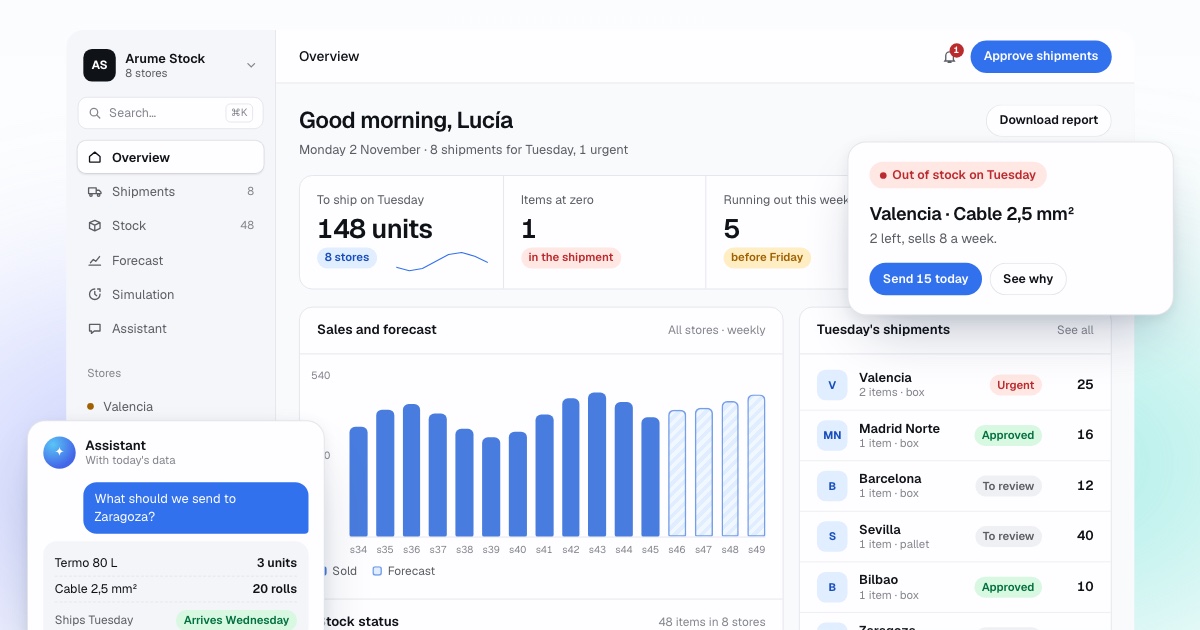
The weekly proposal comes as a dashboard and a sheet per supplier, with one sentence of reasoning per line. WooCommerce has no purchase orders, so the order is placed where you place it today: an email, a supplier portal, or Holded or Odoo if connected. If you want, we update the low stock threshold of each product every week, so that the WooCommerce alert only fires for what really needs ordering.
What about several warehouses and several channels?
Many WooCommerce shops also sell in a physical shop, on Amazon or at fairs, all from one warehouse. WooCommerce does not know. We gather sales from each channel wherever they live and keep stock per warehouse outside, leaving WooCommerce with the quantity it needs to sell. If you use a multi-warehouse plugin, we read from its fields and respect them.
How do we check it, and when do you not need it?
Before proposing anything live, we replay your last year week by week using only what was known each week and starting from the rebuilt stock, and compare it with what you did: demand served, lost sales, orders and cash tied up. Then one or two months in shadow mode, with you ordering as usual.
You do not need this if you sell to order, have few products with a supplier that ships in two days, or sell at a similar rate all year. A threshold set well per product is enough. It pays off with hundreds of variations, a strong season, suppliers that take weeks or several channels. Send an export of orders and we return a free analysis.
Frequently asked questions
Is it a WordPress plugin?
No. Nothing is installed in WordPress or WooCommerce. The software lives outside and reads your store through the REST API with keys you create in the admin. There is less to break on every update and nothing that can slow the shop.
Will it slow my hosting?
No. We read overnight, in small pages with pauses, and calculate on our side. Your WordPress only answers read requests, like any invoicing tool you may already have connected.
Does it need to write to my shop?
By default no. The keys are read-only and the proposal appears in a dashboard and a sheet. If you want the low stock threshold updated per product, you grant that specific permission after the shadow period.
How are cancelled orders and refunds counted?
Cancelled and failed orders are not sales. Refunds are subtracted on their date. Orders pending payment count as demand only once they are completed. All of this comes from the order status in WooCommerce.
I use a multi-warehouse plugin. Does it work?
Usually yes: these plugins store stock per warehouse in fields we can read. We confirm during the data review. Without a plugin, we keep stock per warehouse outside and give WooCommerce the total.
I only get a few orders a day. Is that enough data?
About a year of orders is enough to start, because what matters is the total per product over time. Slow products get a wider forecast and a low-confidence label. With under six months of history, the honest answer is to start with simple rules.