Ask your ERP like a colleague: it answers with your data and shows where every figure comes from.
For whoever decides purchasing, shipments or replenishment and today opens three screens and a spreadsheet to find out how much of something is left in one shop. You type "how much 40 A residual current breaker is left in Seville?" or "why are you sending 15 to Bilbao?" and get the figure, the table it comes from and the date of the data. It reads from your software with a user that cannot change anything.
Book a 30-minute demoHow it works
Read-only connection · Tested on your own data first · Data hosted in the EU · Demos in English or Spanish
The short answer
An AI assistant for your ERP is a program you ask in plain language about stock and sales ("how much is left in Seville?", "why are you sending 15?") and which answers by querying your ERP data. Every figure comes with its source and date; if it has no data, it says so. It reads with a read-only user and changes nothing in the ERP. It serves purchasing, management and shop managers in companies with many shops or warehouses.
By Manuel Gómez González, founder of Arume · Reviewed on
What it does
Plain-language questions, answers with data
"Which shops run out of 2.5 mm cable before Thursday?", "how much did we sell of 80-litre water heaters in October against last October?", "what have I got idle in Málaga for more than six months?". You do not need to know a table name or build a report: write it as you would say it to someone in the warehouse.
Every figure with its source
Under each answer: which data from your software was consulted, with what filter, for which dates and when it was last read. If it says "6 left in Seville", you can open the detail and see the movement that leaves stock at 6. If something does not match what you see in the ERP, you can see where the difference is.
If it does not have the data, it says so
The assistant does not fill gaps. If you ask about a product that is not in your software, a shop with no data for the last week or something the system does not store, such as margin without costs, it says it does not have it and what would be needed.
It explains the shipment proposals
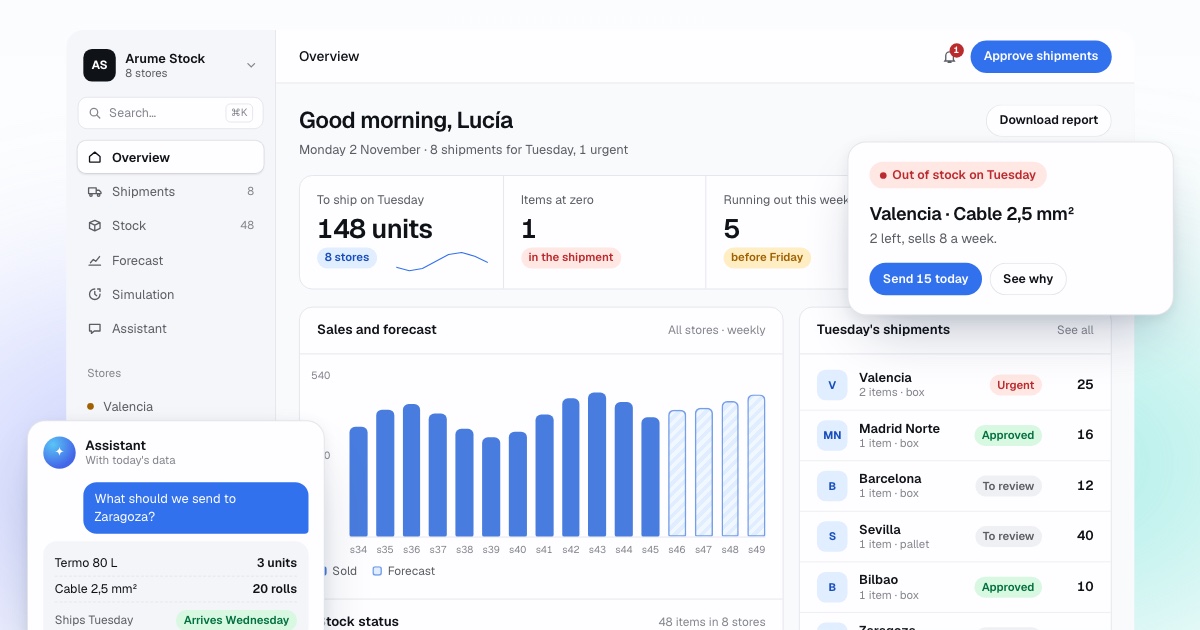
"Why are you sending 15 rolls to Bilbao?" It answers with recent sales, stock today, what is in transit, lead time and stockout risk, in two or three sentences. It is the same explanation that goes on each line of Monday's list, but you can keep pulling the thread.
"What if I send two fewer?"
You can ask it to recalculate with another quantity, another dispatch day or another service level, and it tells you how the stockout risk changes and how many days of stock remain. It is a simulation on the proposal: it touches neither your software nor the order until you approve.
Comparisons and lists that today are a report
The shops that grew most in a family, the ten products with most days at zero last month, what is in excess in one place and short in another for a transfer. The assistant builds them from the data, shows the table and lets you download it to Excel.
It reads, it does not write
It connects with a read-only user. It does not create orders, change prices or move stock in the ERP. What a person approves in the stock system goes back to your software by the route you chose, with its log, never through a conversation.
What is an AI assistant for an ERP?
It is a program where you write questions about your business in ordinary language and which answers by querying your ERP data: stock, sales, movements, shipments and suppliers. It understands "how much 40 A residual current breaker is left in Seville?", turns it into a query on your data, runs it and returns the figure with the table it comes from.
Ours is part of the inventory control system. Besides the ERP data, it knows the forecast for each product at each location and the week's shipment proposal, so it can explain why it proposes what it proposes and recalculate with another quantity. That is the difference from a generic chat bolted onto the software: it knows about replenishment and it knows where its numbers come from.
How is stock checked today in a multi-location company?
In a chain of eight electrical and plumbing supply shops, the question "how much 2.5 mm cable is left in Seville and when will it run out?" has three possible answers today. The ERP stock screen, which gives the figure now but not when it runs out. The sales report, which has to be filtered by shop and product and exported to Excel. Or phoning the shop. Combining the three takes a quarter of an hour, and it happens several times a day.
Unplanned questions are worse. "Which shops have 80-litre water heaters sitting since the summer?" or "how much tap ware have we sold in Bilbao this quarter against the last?" usually end up as a request to whoever knows how to build reports, and arrive when the decision has already been made. The assistant answers them on the spot with the same data that report would use.
What can you ask it, by sector?
Questions change with the sector, but nearly all fit four types: how much is left and where, when it runs out, what happened compared with another period, and why the system proposes what it proposes. These are the kind of questions we hear in demos.
- Electrical and plumbing supplies: "Which shops run out of 40 A residual current breakers before Friday?", "How many half-inch valves do I have sitting in Murcia?"
- Beverage distribution: "Which hospitality customers have not ordered kegs this month and did last month?", "How many kegs are on Tuesday's route?"
- Clothing chains: "Which sizes of this reference are missing in Valencia and in excess in Zaragoza?", "How much of the collection have we sold against last year at this point?"
- Spare parts: "Which critical references have less than a week of stock?", "How many brake pads of this reference left as equivalents?"
- Any sector: "Why are you sending 15 to Bilbao?", "What if I send two fewer?", "What spent most days at zero this month?"
Where does each figure come from?
Every answer carries its source underneath: what data was consulted, with which filters, for which dates and at what time it was last read from your software. If the assistant says "6 rolls of 2.5 mm cable left in Seville; at the pace of the last four weeks they run out on Thursday", the detail shows the stock read from the ERP, the sales of those four weeks and the arithmetic.
This solves the problem that holds these tools back most: nobody trusts a number they cannot check. With the source in view, if a figure does not match what you see in the ERP, you can see why: a transfer pending receipt, a movement from today that has not been read yet, a return counted as a sale. Sometimes the assistant uncovers a data error that had been in the software for months.
Why does it not make things up?
A language model on its own answers with what seems probable, and with figures that is dangerous. In the assistant, the model does not calculate or remember numbers: it understands the question, decides which query is needed, the query runs on your data and the model writes the answer from what comes back. If the query returns nothing, there is no figure to write.
That is why, when it does not have the data, it says so. "I have no sales for the Málaga shop since the 12th: the last read from your software failed" is a valid answer. So is "I do not store purchase cost, so I cannot give you margin; if we read it from your ERP, I can". What it will not do is estimate by eye what is not in the data.
- The language model interprets and writes; the numbers come from queries on your data.
- Every query is logged and can be opened from the answer.
- If a question has two readings, it asks which you mean before querying.
- If the data does not exist or is out of date, it says so and explains what is missing.
What can it do, and what can it not?
It can answer about stock, sales, movements, shipments, forecasts and proposals; build lists and comparisons and leave them in Excel; explain each proposed shipment and recalculate with another quantity, another day or another service level. With that, Monday's proposal is discussed with numbers instead of impressions.
It cannot change anything in your ERP: no orders, no stock moves, no prices. It connects with a read-only user. The Odoo documentation on its external API explains why: an API key gives essentially the same access as the user account it belongs to, so the safe way to connect is a user that can only read. We do the same in Business Central, Sage and SAP Business One.
It does not decide for you either. If you ask "do I send or not?", it gives you the risk and the cost of each option, and the decision belongs to whoever signs the shipment.
Which software does it work with, and who sees what?
With whatever the inventory system reads: Odoo, Microsoft Dynamics 365 Business Central, Sage, Holded, SAP Business One, Shopify, WooCommerce, PrestaShop, Power BI or a spreadsheet that gets updated. In the diagnosis we agree which data is read (sales, stock, movements, shipments, suppliers) and the assistant can only be asked about those.
Permissions are set per person. Typically purchasing and management see everything, and each shop manager sees their own shop and the stock of nearby ones to ask for a transfer. The assistant does not answer about what that person cannot see. Data is stored on servers in the European Union with daily backups, and is not used to train AI models.
How do we test it and start?
In the 30-minute video demo, in English or Spanish, you ask it live about a sample company with eight shops. To see it with your data, the first step is the same as for the rest of the system: an export of sales and stock, then the free analysis and then the backtest on your history. The assistant is built on the same data, so during the backtest you can already ask about your products and shops.
The full set-up, with the read-only connection to your software, takes three to six weeks. In that time we agree the data it reads, each person's permissions and a list of test questions with their correct answers, which is rerun every time something changes to check it still answers correctly.
Frequently asked questions
Which programs does it work with?
With the ones the inventory system reads: Odoo, Business Central, Sage, Holded, SAP Business One, Shopify, WooCommerce, PrestaShop, Power BI or an Excel file that is kept up to date. In the diagnosis we agree what data is read and the assistant can only be asked about that.
Can it get things wrong?
It can misread an ambiguous question, for example "the shop in the centre" if you have two. That is why each answer shows what it queried: if it looked at the wrong shop, you see it at once. What it does not do is give a figure without a query behind it. If the data in your software is wrong, the answer will be too, and the source tells you where to fix it.
Can it create orders or change stock in our ERP?
No. It connects with a read-only user. It can propose a shipment, explain it and recalculate it with another quantity, but approval happens in the system and the approved order reaches your software by the agreed route, with its log. Nothing reaches the ERP from a conversation.
Who can ask it questions and what does each person see?
You decide. Usually purchasing and management see everything, and each shop manager sees their shop and the stock of nearby ones. Permissions are set per person and the assistant does not answer about what that person cannot see.
Is our data used to train AI?
No. Your data is queried to answer your questions and stays on servers in the European Union, with daily backups. Before we start, we give you in writing which providers are involved, where each one is and under what conditions they process data.
Do I need to word questions in a special way?
No. You write as you speak: "how much of this is left there?", "what runs out this week?", "compare October with last October". If a question has two readings, the assistant asks which you mean before querying.
Can it be used from WhatsApp?
Yes, as an add-on. The same assistant answers on WhatsApp to registered people, with the same permissions as on the web. It is useful for managers and drivers who will not open a dashboard for one question.