PrestaShop tells you how much stock you have. We tell you how much you will need.
For PrestaShop stores, with or without physical shops, that restock from Catalog > Stock, from a stock module or from a separate spreadsheet. We read orders, combinations and available stock, calculate what you will sell of each product and each size or colour until the next supplier order arrives, and propose this week's purchase with the reason for every line.
Book a 30-minute demoHow it works
Read-only connection · Tested on your own data first · Data hosted in the EU · Demos in English or Spanish
The short answer
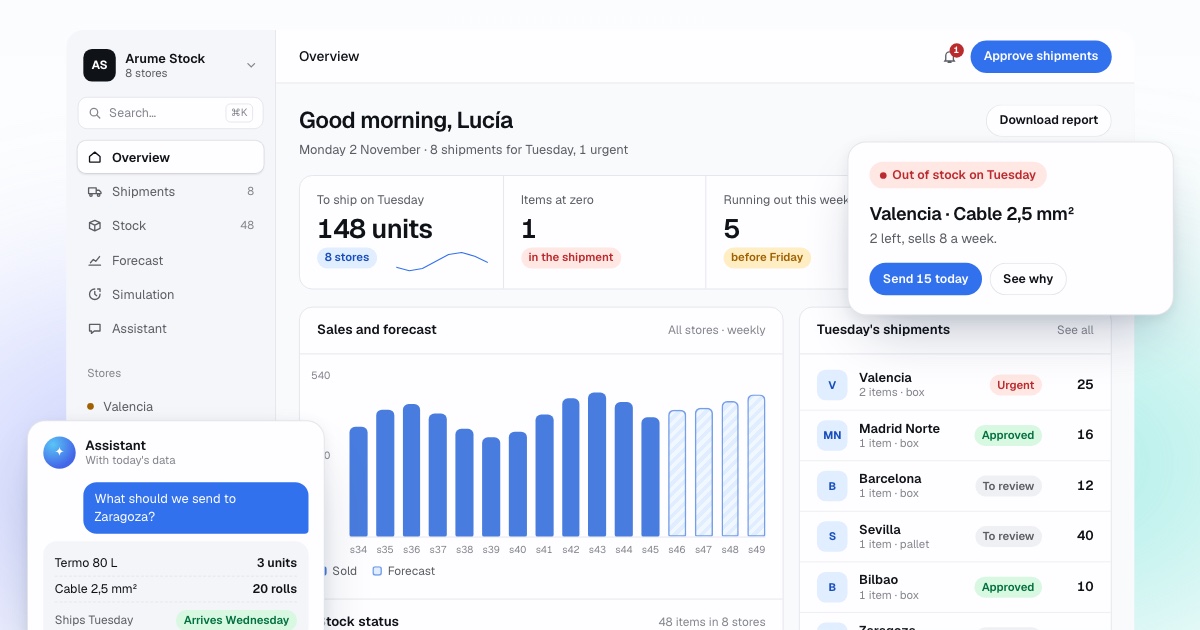
PrestaShop stock management adds what the shop does not include from version 1.7 onwards: a sales forecast per product and per combination, a warning based on the risk of reaching zero before the next delivery, and the weekly order for each supplier with its reasoning. The system reads orders and available stock through the PrestaShop webservice with no module installed, and it is tested first against the shop's own order history.
By Manuel Gómez González, founder of Arume · Reviewed on
What it does
What PrestaShop already does
The Stock page shows physical, reserved and available quantities for each product and combination, and a Movements tab keeps the history of changes. Products under their low stock threshold are highlighted. We do not touch any of it.
Where it stops
The low stock level is a fixed number you set per product. PrestaShop does not know whether the product sells 2 a week or 40, or whether the supplier takes three days or a month. Purchase orders to suppliers are not part of the core stock tools.
Forecast per combination
In fashion, footwear or spare parts, what runs out is not the product but size 42 or the sand colour. Each combination is forecast with its own sales and the size curve of the product.
The weekly supplier order, with reasons
The purchase list comes grouped by supplier with a note per line, for example: sells 11 a week, supplier takes 15 days, 9 available and 3 reserved, 14 % risk of stock-out. You review it, change it and send it as usual.
Campaigns and discounts flagged
Discounted sales are marked so a promotion does not teach the model that a product always sells triple. The sale season is prepared from last year and from the last two weeks.
Webservice connection, no module
PrestaShop includes a webservice, disabled by default. You enable it under Advanced Parameters > Webservice and create a key with read rights only on the resources we need.
How does PrestaShop manage stock today?
In PrestaShop 8 the Stock page lives under Catalog, and the official documentation says no set-up is needed. The Stock tab shows, per product and combination, physical stock (what you actually hold), reserved stock (what is in open customer orders) and available stock, linked by the formula physical minus reserved equals available. The Movements tab records every change in quantity.
Products below their low stock threshold are highlighted, with a quick filter to bring them to the top. Quantities are edited by typing the change, not the final value, and since version 1.7.3 several products can be edited in bulk. The whole table can be imported or exported as CSV.
What happened to advanced stock management?
PrestaShop 1.5 and 1.6 had an optional advanced stock management feature, with warehouses, movements, stock coverage and supplier orders. The PrestaShop team explained on its blog that only 8.7 % of the retailers they interviewed kept using it in 1.6. Version 1.7 kept the basic tools (overview, quantity editing, movement history) and moved advanced needs to PrestaShop ERP, a set of add-on modules built with Boost My Shop and sold on PrestaShop Addons.
The closest thing to a forecast was stock coverage: the number of days your stock was expected to last, based on past movements. It was an average. It knew nothing about seasons, promotions or supplier lead times.
Why is the low stock level not enough to decide an order?
The low stock level is a fixed threshold. It works as an alarm, but not as an answer to Monday's question: how much do I order, and from whom? A product that sells 40 a week with a supplier that takes a month needs a threshold above 160. One that sells 2 with a 48-hour supplier needs almost none. With the same 5 across the catalogue, the first runs out and the second piles up.
In an online shop, demand also spikes in ways a fixed alarm cannot see: sales, Black Friday, back to school, a product that appears on social media. By the time the alert fires, there is no time to order. We calculate for each product and combination the probability of reaching zero before the next order arrives, with the real lead time of the supplier, and we warn on that risk instead of a fixed number.
Why is it the size that runs out, not the product?
Every variant in PrestaShop (size, colour, capacity) is a combination with its own available stock. Take a trainer with eight sizes selling 60 pairs a week in total. The middle sizes sell several times more than the extremes: if size 41 takes 20 % of sales and size 38 takes 4 %, a three-week order of 180 pairs should include about 36 of size 41 and about 7 of size 38.
Split evenly, you would order 22 or 23 of each. Size 41 would run out with 13 pairs of demand unserved, and you would hold about 15 surplus pairs in size 38. We forecast each combination from its own sales and, when it has little history, from the size curve of the product and its family, which is far more stable.
What do we read from PrestaShop, and what do we return?
We connect through the PrestaShop webservice. To enable it, go to Advanced Parameters > Web service and set it to Yes; it is disabled by default. Then add a webservice key (32 characters, generated or your own) and assign rights per resource. The PrestaShop developer documentation says plainly: do not give all the rights for all resources to any key. We request read access to the resources we need and nothing more.
We read orders and order lines, products and combinations, available stock and, if present, suppliers. Customer personal data is not needed and is not read. With orders and today's stock we rebuild stock for every day backwards, so days without sales caused by missing stock do not count as days without demand.
What comes back is the weekly supplier order list, the risk alerts and a stock dashboard. By default we write nothing to the shop. If you want, we can write an updated low stock level per product, so the PrestaShop alarm becomes useful too.
- We read: orders and order lines, products, combinations, available stock and suppliers.
- We return: the weekly order per supplier, risk alerts and a stock map (zero, running out, fine, surplus).
- Optional: low stock level recalculated per product and written to the shop.
What about physical shops and several warehouses?
If you sell only online from one warehouse, we work with PrestaShop's available stock. If you also have physical shops, their stock usually sits in a point-of-sale system, a multi-warehouse module or a connected ERP. We find where each quantity is kept and read it from there. Each location is forecast from its own sales, and we suggest moving stock between them before we suggest buying.
What do we not do, and how do we start?
We do not replace PrestaShop or your stock modules. We do not buy by ourselves, and we do not change prices or products. We reduce the risk of stock-outs and tell you what that risk is, product by product. With a hundred products, a two-day supplier and steady sales, a well-set low stock level and a monthly review are enough.
To check it, we replay your past months, deciding each week with only what was known that week, and compare with what you did. Then one or two months in shadow mode. The free analysis starts from an order export and the CSV from Catalog > Stock.
Frequently asked questions
Does PrestaShop have advanced stock management?
Not in current versions. PrestaShop 1.5 and 1.6 had an optional advanced stock management feature. From 1.7 the core keeps a stock overview, quantity editing and movement history, and advanced needs moved to add-on modules.
Do we need to install a module?
No. We read through the webservice that PrestaShop includes, enabled under Advanced Parameters > Web service. We create a dedicated key with read rights on orders, products, combinations and available stock only.
What if we already use a multi-warehouse module or an ERP?
Even better: we read stock per warehouse from wherever it is kept. If the shop sends orders to Odoo, Holded or Sage, it sometimes makes sense to read from there. We decide during the data review.
Does it forecast by size and colour?
Yes. Each size or colour is a combination with its own available stock, and we forecast each one from its own sales and the size curve of the product.
What about packs?
PrestaShop lets you choose how a pack deducts stock. We read that setting and count the sale of each product inside a pack too, so we do not under-order.
How much order history do we need?
One year of orders lets us learn the season and calculate orders for products that move. Two years improves the campaign forecast. For a newer shop we start with simple rules and show low confidence on each line.