Holded inventory forecasting: stock alarms that know how fast things sell
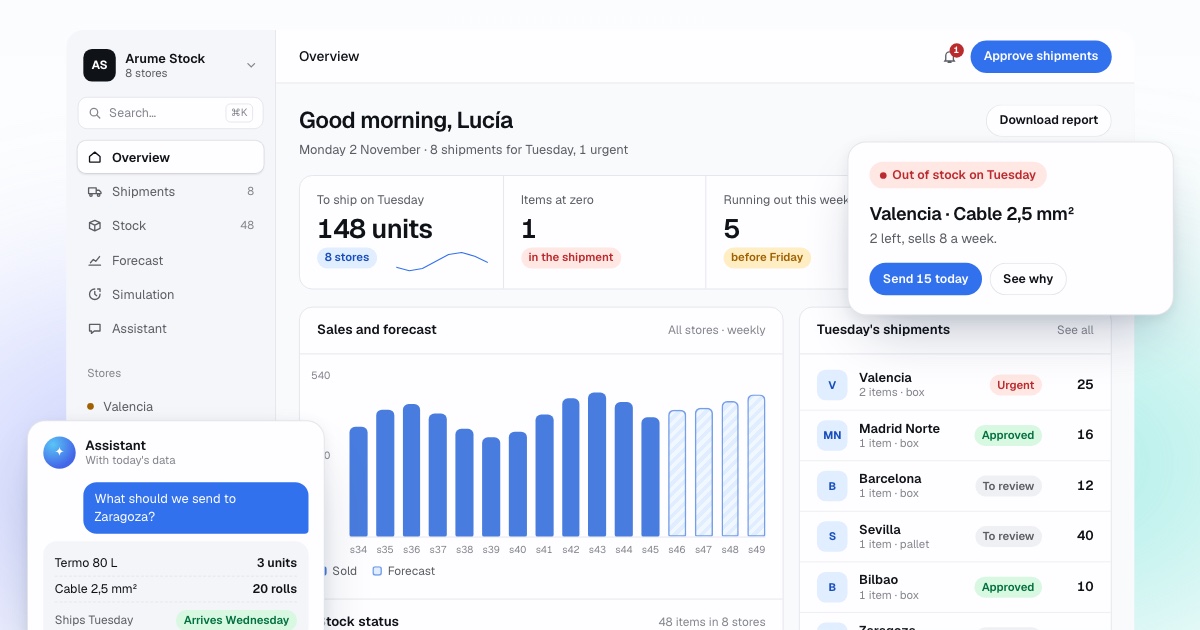
Holded keeps stock tidy next to your invoices. Its alarm tells you a product is below a number somebody typed. We read your Holded account through its API, forecast each product in each warehouse, and propose the week’s purchases with the reason. Invoices and accounting are never touched.
Book a 30-minute demoHow it works
Read-only connection · Tested on your own data first · Data hosted in the EU · Demos in English or Spanish
The short answer
Holded stock management gives each product a stock alarm: a minimum quantity that flags the product when stock falls below it. It does not look at sales pace, supplier lead time or season, and it does not say how much to order. Arume reads products, warehouses, stock, sales and open purchases through the Holded API, forecasts demand per product and warehouse, and proposes purchase orders grouped by supplier, which a person reviews before anything is created in Holded.
By Manuel Gómez González, founder of Arume · Reviewed on
What it does
Alarms that mean something
The minimum for each product is recalculated from its own sales pace and supplier lead time, so the red label shows up in time for the products that matter.
How much to order
Quantity worth ordering once shipping cost and cash tied up on the shelf are counted. An order that does not pay off is not proposed.
Purchase orders grouped by supplier
Created in Holded as pending review, with the reason on each line. When one supplier order goes out, other products of theirs that are running low are added.
Stock history rebuilt
Holded has the stock of today, not of each past day. We rebuild it backwards so a product that sat at zero is not read as one that does not sell.
Several warehouses and channels
Shop, web and marketplace sales that land in Holded are read from one place, and transfers between warehouses are proposed before buying.
Replay on your history
Past weeks decided again with what was known then and compared with what you did.
What does Holded do with inventory out of the box?
Holded is cloud business software that puts invoices, collections, accounting and inventory in one account. Each product has a record, variants if you use them, purchase and sales price, and stock per warehouse. Sales invoices and delivery notes reduce stock, purchase orders and purchase delivery notes add to it, and you can run counts, track batches and see what sits in each warehouse.
To avoid running out, Holded has stock alarms. According to Holded’s help centre, you open a product under Inventory > Products, choose Assign stock alarm, enter the minimum number of units and confirm. Products with batches can have a separate value for each batch. Products that fall below the value show a red Stock label in the product list and appear in the stock alarm report.
That is the logic of a hand-written reorder point, and for a shop with few products it works. Holded also exports to Excel, connects to online shops and marketplaces, and has an API so other programs can read and write in the account.
Why do stock alarms fall short for deciding what to order?
The stock alarm has three limits. A person sets it once, when the product is created, and with 600 products nobody reviews it afterwards. It says you are under the line but not how much to order, so someone decides by eye, looking at the product page. And it ignores sales pace, supplier lead time and season: a minimum of 10 means the same for a product that sells two a month from a supplier who delivers in 48 hours as for one that sells 20 a week and takes three weeks to arrive.
What happens in practice is that the alarm fires every day for products that do not matter and does not fire in time for the ones that do. The person who buys ends up ignoring it and ordering as before: out of habit, from what they see on the shelf, or from a spreadsheet exported from Holded on Monday morning. Holded records what has happened well. It does not help to decide what comes next.
How do we connect to Holded?
Holded has an API with a key you generate from your own account. According to its help centre, you go to Settings > Developers > Credentials, add an API token and choose its permissions. Each token has its own permissions: you choose which modules it can reach and whether it has read, write or full access, and tokens do not inherit permissions from user roles. The token is shown only once, when it is created. Holded states that the API is available on all paid plans.
We ask for a token with read access to sales, inventory and purchasing, and write access only to purchase documents if you choose to allow it. With that we read products and variants, warehouses, stock per product and warehouse, sales invoices and orders with date and lines, and open purchase orders. The reading happens overnight, in pages, without loading your account and without anyone exporting anything.
Going the other way we write little and only with permission: the week’s purchase order, grouped by supplier, created in Holded pending review. If you want, we also update each product’s alarm value so the red label means something again. Invoices, collections and accounting are never touched. Holded notes that its own support does not build custom integrations, which is one reason we look after the connection ourselves.
If your plan has no API access, nothing is lost. We start from Holded’s Excel exports, which every plan has, and swap to the API when you have it.
How do we decide what to order with Holded data?
With a year of sales we have, for each product in each warehouse, a sales pace and how it varies week to week. With two seasons we learn the seasonal pattern. And from purchase orders we calculate each supplier’s real lead time using order and receipt dates, which is often different from the one everyone has in their head.
From that, for each product we estimate demand until the next order can arrive as a range, calculate the risk of reaching zero and the quantity worth ordering in currency: what would be sold against what shipping costs and what the money tied up on the shelf costs. An order that does not pay off does not go out. And when an order is already going to a supplier, we use it to top up the other products from that supplier that are running short, which is what a good head of purchasing would do and what rarely happens by hand across 600 products.
The stock of each past day is almost never stored, in Holded either. It is rebuilt backwards from today’s stock using sales and purchases, so the system knows which days you did not sell a product because there was none. Without that it would learn that the product does not sell and order less of the one you most need.
What about several warehouses, shops and sales channels?
Many Holded companies have one warehouse and two or three shops, each set up as its own warehouse, and also sell through Shopify, WooCommerce, PrestaShop or a marketplace connected to Holded. The sales from every channel end up in Holded as invoices or orders, so we read from one place and nothing has to be merged.
The decision is made per warehouse: what each shop sells, at what pace, what it holds. Before ordering from a supplier we check whether what is missing in one shop is surplus in another and propose the transfer. What is short everywhere is bought, grouped by supplier so that one order goes out where three small ones would have.
How is it checked before a single order is created?
First an exam on your own past months: the system decides again each week with only what was known that week, from the stock that really existed, and the result is compared with what you did: demand served, sales lost in currency, orders, units and money tied up. The measures are fixed before looking at the result. If it does not improve on what you do, we say so and stop.
Then one or two months in shadow mode: every week it proposes with fresh data and you decide as usual, noting what you accept. Only when the test convinces do we get permission to create purchase orders in Holded, and even then each order waits for someone to review and send it. The simulation page explains the method in detail.
When are Holded’s alarms enough?
If you have a few dozen products, one warehouse, a supplier who delivers in two days and sales that look the same all year, well-set stock alarms are plenty. Review them once a quarter and you need nothing more. We will tell you that in the diagnosis if it is your case.
It starts to pay when several of these combine: hundreds or thousands of products with minimums nobody reviews, several warehouses or shops, marked seasons, suppliers that take weeks, batches that expire, and one person who spends Monday mornings deciding orders from a table taken from Holded. If that is you, send us a Holded export and we return a free analysis of your stock. Set-up takes three to six weeks.
Frequently asked questions
Do I have to leave Holded?
No. Holded stays as your system. We read from it and, if you allow it, create purchase orders pending review.
Which Holded plan do I need?
Holded states the API is available on all paid plans. If you are on the free plan, or prefer not to use the API at first, we start from Excel exports.
Does it touch my invoices or accounting?
Never. The token you create has permissions per module, and we ask for read access to sales and inventory and write access only to purchase documents, if you agree.
My stock in Holded is not clean: negatives and duplicate products. Does it still work?
Usually yes. The first report lists negatives, duplicates and records with no supplier lead time, which is useful to fix on its own.
How do I see why each quantity was proposed?
Every line carries its reason: sales pace, supplier lead time, stock on hand and on order, and risk. You can also ask the assistant, which says where each figure comes from.
Can it replace Holded’s stock alarms?
It can keep them accurate by updating the minimum on each product, or work next to them. Either way Holded keeps showing its red Stock label.